


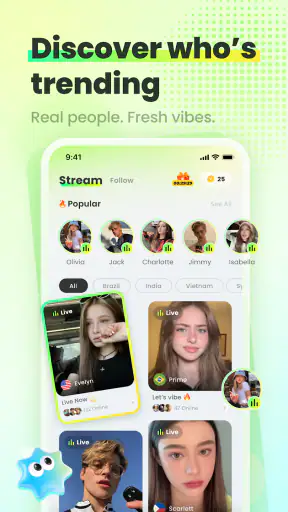



Vero Live is the kind of social app I open when I want to watch people interact in real time rather than scroll through carefully edited posts. Funbytes Dev Team presents it as a live-streaming hub, but my experience with it is less about passive video and more about the changing rhythm of live rooms, conversations, and audience participation. That immediacy is its main appeal, although it also means the app asks more from your attention than an ordinary social feed.
The app is free to install, carries a Mature 17+ age rating, and runs on Android 7.0 or later. Its current version is 2.0.0, and it has already passed the one-million-install mark. Those details make it approachable for people using older Android phones, while the age rating is an important reminder that this is not an app I would hand to a younger teenager without supervision. I would describe it as a social viewing and interaction space for adults who are comfortable with unpredictable live content.
How Vero Live feels to use from the first screen
Readability and navigation in a fast-moving app
The biggest challenge in a live-streaming app is not finding a video; it is understanding what deserves attention when several things are happening at once. Vero Live is easiest to approach when I treat it as a place to browse live rooms deliberately instead of tapping randomly through every available option. I look first for the stream that matches my mood, then give it enough time to decide whether the host and conversation are worth following.
That workflow sounds simple, but it matters for users who find rapid visual changes tiring. Live services often combine moving video, chat activity, icons, notifications, and reactions. Even when the basic navigation is understandable, the total amount of information can feel crowded. I found it more comfortable to pause between choices rather than trying to keep up with every on-screen signal.
For someone with reduced vision, readability depends heavily on the phone’s own display settings and on the individual stream. Text in a chat can change quickly, and the contrast between video elements and interface controls may vary from room to room. Enlarging system text may help with general menus, but it can also make a busy screen feel tighter. My practical advice is to use the app in a quiet setup, increase brightness only as much as comfortable, and avoid judging the experience from a very small screen.
The average rating is 4.6 from roughly 5.7 thousand ratings, which suggests that many people find the core experience appealing. I would not treat that figure as a guarantee of easy navigation for everyone, because live social apps are especially personal: one viewer may enjoy constant activity while another may find it overwhelming. The app has 54 written reviews, so I would pay more attention to my own tolerance for fast conversations than to the rating alone.
I also recommend separating discovery from participation. On a first visit, browse a few rooms without immediately commenting or spending anything. This gives you a clearer sense of how hosts communicate, how quickly chat moves, and whether the layout feels manageable. It is a useful habit for any new user, but particularly helpful if reading speed, concentration, or visual processing is a concern.
Motor and sensory considerations
Live interaction can create pressure to tap quickly. A viewer may want to open a profile, send a reaction, follow a host, or respond in chat before the moment passes. For people with limited dexterity, tremors, fatigue, or slower reaction times, that pace can turn a social activity into a test of precision. I would use a stable surface or a phone stand when possible, because holding the device and trying to interact with small controls at the same time is needlessly demanding.
A keyboard is another practical consideration. If typing on a phone is uncomfortable, the social side of the app may feel much less accessible than the viewing side. Watching a stream can be relatively low effort, while joining the conversation may require repeated taps and quick text entry. I would not assume that every user gets the same value from Vero Live simply because everyone can open a stream.
Sensory load is equally important. Live video brings changing voices, music, reactions, and visual movement, and the combination can be tiring for people who are sensitive to sound or flashing activity. I prefer using headphones only when I can control the volume comfortably; otherwise, a speaker at a low level gives me more awareness of my surroundings. If a room becomes too intense, leaving it is a better solution than trying to endure it for the sake of staying involved.
Users who are hard of hearing should think carefully about whether a particular broadcast communicates enough through visible context. I would not rely on audio alone if I needed dependable access to every spoken detail. Conversely, viewers who struggle with dense text may find rapidly moving chat just as difficult as fast speech. The app can still work as a visual live-video experience, but the usefulness of any one stream depends on how the host and audience communicate.
One non-obvious strength of live viewing is that it can be less demanding than creating content. I can enter briefly, observe, and leave without preparing a post, editing a clip, or maintaining a public profile. That makes the app a reasonable choice for someone whose energy varies from day to day. The trade-off is that the content itself is less predictable and may not wait for me to process it.
Using the app in real everyday situations
A realistic use case is an evening when I have ten or fifteen minutes free after work. Instead of committing to a long video, I open Vero Live, browse a few live rooms, and settle into one that has a conversation I can follow. If I am tired, I watch without commenting. If I have more energy, I join the chat for a while. That flexible level of involvement is more useful to me than a platform that assumes every visit should become a major social event.
It also works during a quiet break when I want company without arranging a call. The live format gives a sense of presence, but I am still in control of when I leave. I would not use it while driving, walking through traffic, or doing work that needs concentration. The constant possibility of new visual and social prompts makes it a poor companion for divided attention.
For people with limited energy, the best routine is to set a personal time boundary before opening the app. Live platforms are designed around continuation: one room leads to another, and an interesting exchange can make a short visit stretch much longer. A simple timer or a planned stopping point helps keep the experience recreational rather than draining.
Travel and connectivity also change the experience. A live stream is more sensitive to unstable service than a downloaded article or an ordinary offline activity. If I am somewhere with unreliable access, I would avoid depending on Vero Live for an important conversation or scheduled moment. It is better suited to casual use where interruptions are acceptable.
What makes it different from ordinary social alternatives
Compared with a conventional social network, Vero Live puts immediacy first. A regular feed lets me read at my own speed, revisit a post, and ignore most updates without missing a shared moment. Live rooms are different: the appeal comes from being present while something is happening. That makes the app feel more spontaneous, but it also reduces my control over pacing.
Compared with short-video platforms, the emphasis is less on polished clips that are easy to replay and more on the atmosphere of a current broadcast. Short videos are usually better when I want quick entertainment with predictable length. Vero Live is better when I want interaction, an unfolding conversation, or the feeling of dropping into an active room.
Compared with private messaging, it offers broader discovery but less intimacy. I would choose a private chat for sensitive conversations, reliable communication, or a group of people I already know. I would choose Vero Live when I want to encounter public live content and decide moment by moment whether to participate.
That difference also explains who should skip it. If you dislike public interaction, need complete control over content timing, or become uncomfortable with unpredictable conversations, a recorded-video service may be a better fit. Vero Live is not automatically an upgrade over those alternatives; it is useful precisely for the live quality some people enjoy and others find stressful.
Practical decisions about money, age, and privacy
The no-cost entry point makes it easy to try the app without committing to a subscription. However, in-app purchases range from 99 cents to 99.99 dollars per item. I would treat that range seriously, especially in a live environment where social excitement can encourage impulsive decisions. My own rule would be to explore the app first, decide whether paid interaction adds meaningful value, and set a firm spending limit before purchasing anything.
That spending advice is not just about saving money. In a live room, attention and generosity can become linked: a viewer may feel that contributing is part of belonging. I prefer to keep those choices separate. Enjoying a host’s content does not create an obligation to buy, and a comfortable experience should not depend on spending.
The Mature 17+ rating also shapes my recommendation. I would not describe Vero Live as a general family social app. Adults should still use judgment when entering unfamiliar live rooms, avoid sharing personal details casually, and leave conversations that become uncomfortable. The live format can make boundaries feel less clear than they are in a static post, so I think deliberate participation is essential.
Before becoming active, I would decide how much personal information I want connected to my public presence. A simple profile and limited conversation can be enough to enjoy live content. I would avoid revealing a workplace, home location, daily routine, or other details that make it easier for strangers to identify me. This is a sensible habit on any public social service, but the directness of live interaction makes it especially relevant here.
Remaining barriers that affect inclusion
Vero Live’s strongest feature, its real-time nature, is also its main accessibility barrier. A recorded post can be paused, replayed, or examined later. A live exchange moves on whether or not I am ready. That affects people with slower reading speeds, attention differences, hearing difficulties, fatigue, or limited dexterity in different ways, but the result is similar: participation can require more effort than simply opening the app.
Another barrier is inconsistency between streams. The app provides the environment, but individual hosts influence how understandable and welcoming each room feels. One host may speak clearly and explain the context of a conversation; another may rely on rapid speech, inside jokes, or a busy visual presentation. I would judge accessibility room by room rather than assuming that a comfortable experience in one broadcast will carry over to the next.
There is also a social barrier for users who prefer observation. Although watching quietly is a valid way to use the app, live communities can make active participation seem expected. New users may feel pressure to comment, follow, react, or spend. I think the platform works better when I remember that silent viewing is still a complete use case, not a failure to engage.
Older Android support is helpful for people who cannot replace a phone frequently, but hardware age can still affect comfort. A smaller display, weaker speaker, limited battery, or slower performance may make a busy live interface harder to use. The minimum operating-system requirement is not the same thing as a promise of an equally smooth experience on every compatible device. If the app feels cramped or tiring, a larger screen may improve usability more than changing social habits.
For users who need formal accessibility guarantees, specialist communication tools or carefully moderated communities may be a safer choice. I would also choose a different service for private support groups, structured learning, or situations where captions, transcripts, or predictable moderation are essential to participation. Vero Live can be enjoyable, but it should not be mistaken for a tailored accessibility platform.
Who I would recommend it to
I would recommend Vero Live to adults who enjoy discovering live personalities, dipping into public conversations, and choosing their level of involvement. It is particularly appealing if you want something more immediate than a normal feed but less demanding than arranging a direct call. The free entry point makes experimentation easy, provided you keep the purchase options in perspective.
I would also suggest it to people whose social energy changes. You can watch for a short time, participate when comfortable, and leave without explaining yourself. That flexibility is a real benefit. It is not the same as a quiet, predictable app, but it can be a good middle ground between solitary scrolling and active socializing.
I would not recommend it as the first choice for children, people who need tightly controlled content, or anyone who finds live audio-visual activity overwhelming. I would also hesitate to suggest it to someone who wants a dependable archive of every conversation or a fully paced viewing experience. In those cases, recorded media, private messaging, or a more structured community will probably be kinder and more practical.
My inclusive verdict after using it
Vero Live is most successful when you use it on your own terms. I get the most from it when I choose a calm setting, browse before participating, set a time limit, and treat paid features as optional rather than socially required. Those habits do not remove every barrier, but they make the live format easier to manage.
Funbytes Dev Team has built an accessible starting point in the sense that the app is free to try and supports Android versions that are not especially new. Still, inclusion here depends heavily on the stream, the device, the user’s sensory comfort, and the ability to keep up with live interaction. I would not promise the same experience for every person, and I would not use the rating as a substitute for testing the interface personally.
My final view is positive but measured. Vero Live is a worthwhile social app for adults who value immediacy and casual live company, and its audience of over one million installs shows that the format has broad appeal. It is less suitable when readability, pacing, privacy, or predictable communication must come first. Try it as a viewer before becoming an active participant, keep your boundaries clear, and decide whether the energy of live rooms feels welcoming or exhausting. For me, that honest trial is the best way to tell whether this particular social space belongs on your phone.


